
In-year updates vs quarterly updates: how MTD submissions actually work
2026-05-11
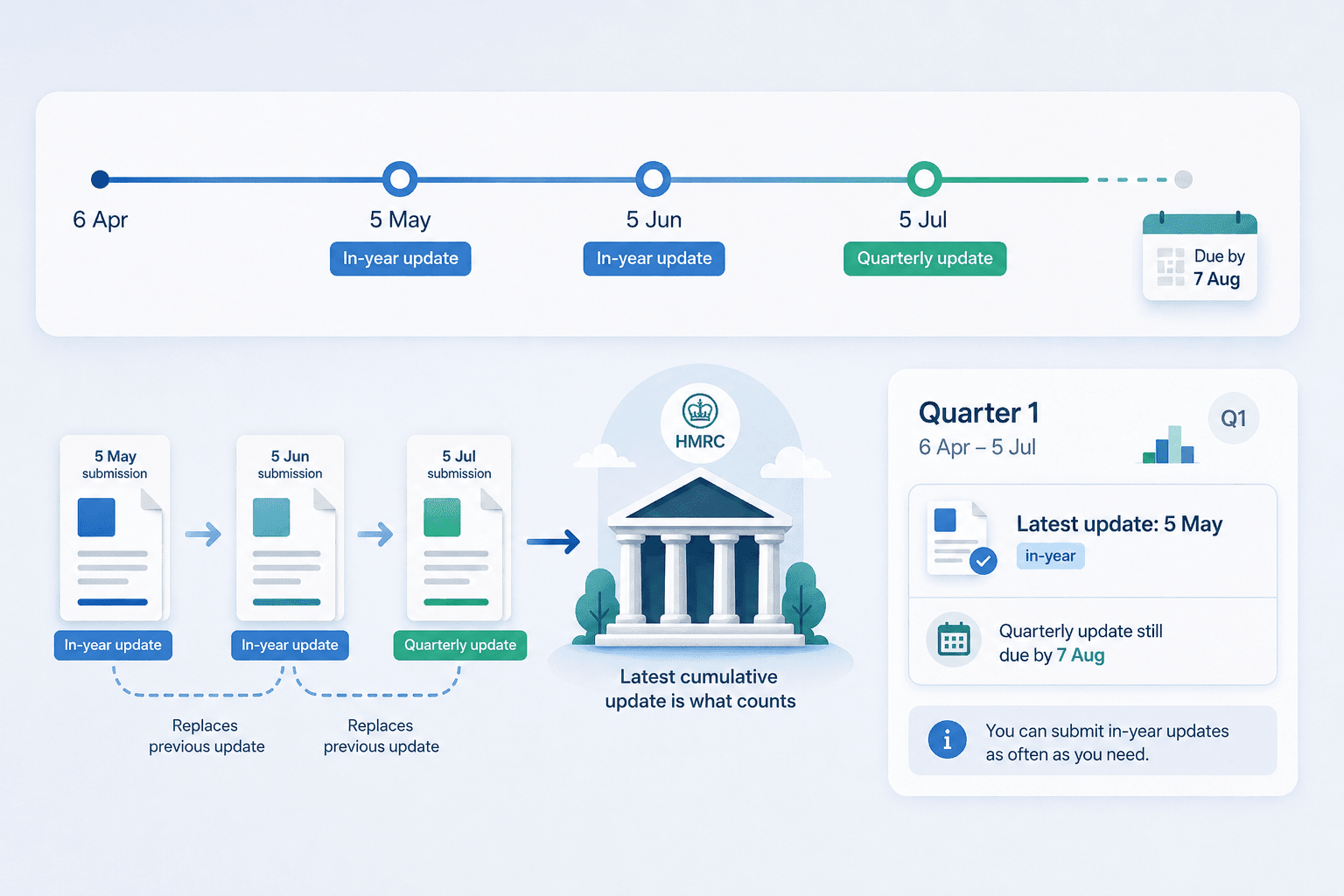
Making Tax Digital for Income Tax is usually explained as "quarterly updates".
That is true, but it is also slightly incomplete.
Under MTD, you do have four mandatory quarterly update deadlines during the tax year. For most people using the standard tax year quarters, the first quarter of 2026 to 2027 covers 6 April 2026 to 5 July 2026, and the first quarterly update is due by 7 August 2026.
So far, simple enough.
But here is the part that can trip people up:
You can also submit updates more often than quarterly if you want to.
That might be monthly. It might be whenever you have finished updating your spreadsheet. It might be halfway through a quarter because you want HMRC to have your latest figures.
Those extra submissions are not extra quarterly deadlines. They are better thought of as in-year updates.
That means you can have:
- an in-year update on 5 May
- another in-year update on 5 June
- the actual quarterly update for the period ending 5 July
- and the quarterly deadline still being 7 August
This is confusing at first because the words sound similar. "Quarterly update" sounds like the only kind of update. But the practical rule is easier than the language makes it sound:
A quarterly update is the mandatory update for the full quarter. An in-year update is an optional update inside the quarter.
The rest of this guide explains how that works in plain English.
The simplest version
Under MTD, your software sends HMRC summary totals from your digital records.
Those totals are not a full tax return. They are not your final tax bill. They are not the same thing as the old Self Assessment tax return.
They are summary updates during the year.
For most sole traders and landlords, the rhythm looks like this:
| Period | Covers | Deadline |
|---|---|---|
| Quarter 1 | 6 April to 5 July | 7 August |
| Quarter 2 | 6 April to 5 October | 7 November |
| Quarter 3 | 6 April to 5 January | 7 February |
| Quarter 4 | 6 April to 5 April | 7 May |
The important thing to notice is that the updates are cumulative.
That means each one covers the tax year so far.
So Quarter 2 is not just July to October. Quarter 2 covers 6 April to 5 October.
Quarter 3 covers 6 April to 5 January.
Quarter 4 covers the full tax year.
That cumulative model is the key to understanding in-year updates.
If each update is just the latest snapshot of your year-to-date figures, then submitting more often is not a completely different thing. It is simply sending HMRC a newer snapshot.
Why "quarterly" does not mean "only four submissions"
When people hear "quarterly updates", they naturally assume HMRC only wants one update every three months.
That is the minimum structure, but it is not the whole picture.
HMRC needs you to meet the quarterly obligations. Those are the important deadline points. But if your software allows it, you can send updates more often.
For example, in the first quarter:
- You update your records on 5 May and submit figures up to 5 May
- You update them again on 5 June and submit figures up to 5 June
- You finish the quarter on 5 July and submit figures up to 5 July
- Your quarterly obligation is due by 7 August
The 5 May and 5 June updates are in-year updates.
The 5 July update is the quarterly update, because it covers the full quarter.
The deadline is still 7 August.
The earlier submissions do not remove the need to submit the full quarterly update. They just give HMRC a more up-to-date view during the quarter.
The two dates that matter
This is probably the most important part.
There are two different dates involved in every submission:
- The period end date
- The date you actually submit
They sound similar, but they mean different things.
The period end date means: "What date do these figures go up to?"
The submission date means: "When did I click submit?"
Those two dates do not have to be the same.
Example: submitting late
Say Quarter 1 covers 6 April to 5 July.
You forget to submit on time and eventually click submit on 15 July.
If your figures cover 6 April to 5 July, then the period end date is still 5 July.
That is a quarterly update, even though you submitted it on 15 July.
Why? Because the figures cover the full quarter.
Example: submitting early inside the quarter
Now imagine you click submit on 15 July for Quarter 2.
Quarter 2 covers 6 April to 5 October.
If your figures only go up to 15 July, then your period end date is 15 July.
That is an in-year update.
Why? Because the figures do not yet cover the full quarter.
This is the bit that makes everything click:
The update type is based on the period end date, not the day you press the submit button.
A worked example: Quarter 1
Let's use the first MTD quarter for the 2026 to 2027 tax year.
Quarter 1 covers: 6 April 2026 to 5 July 2026
The deadline is: 7 August 2026
Now imagine Steve is a self-employed bricklayer. He keeps his income and expenses in a spreadsheet.
He likes to keep on top of things monthly, so he updates his spreadsheet at the end of each tax month.
5 May
Steve has entered everything from 6 April to 5 May.
He submits through flonancial.
That submission covers: 6 April to 5 May
That is an in-year update.
It is useful, but it is not the full quarterly update yet.
5 June
Steve updates his spreadsheet again.
Now his figures cover: 6 April to 5 June
He submits again.
That is also an in-year update.
It replaces the previous in-year snapshot HMRC had from 5 May.
5 July
Steve updates his spreadsheet again.
Now his figures cover: 6 April to 5 July
He submits again.
This is the Quarter 1 quarterly update, because it covers the whole quarter.
7 August
This is the deadline for the Quarter 1 update.
If Steve submitted the full 6 April to 5 July figures before 7 August, he has met the quarterly deadline.
The earlier 5 May and 5 June updates were optional. The 5 July period-end update is the one that satisfies the quarter.
What "latest update" means
Because the updates are cumulative, HMRC is interested in the latest version of the summary figures for that period.
Think of it like saving a document. You might save a draft on Monday, another version on Wednesday and the final version on Friday. You do not end up with three separate stories. You have the latest version of the same thing.
MTD is similar.
If you submit an in-year update on 5 May, HMRC has your figures up to 5 May.
If you then submit on 5 June, HMRC has your figures up to 5 June.
If you then submit on 5 July, HMRC has your figures up to 5 July.
The latest cumulative update is what matters.
That is why corrections are easier under the cumulative model. If you realise you missed an expense in May, you do not need to go back and create a special amendment for May. You fix your digital records, then send the next cumulative update with the corrected totals.
Does an in-year update count as the quarterly update?
Only if it covers the full quarter.
This is where people can get caught.
A submission on 5 May does not count as the Quarter 1 quarterly update, because Quarter 1 runs to 5 July.
A submission on 5 June does not count either.
A submission with a period end date of 5 July can count as the Quarter 1 quarterly update.
So the question is not "Did I submit something during the quarter?"
The question is:
Have I submitted cumulative figures up to the quarter end date?
For Quarter 1, that means up to 5 July.
For Quarter 2, that means up to 5 October.
For Quarter 3, that means up to 5 January.
For Quarter 4, that means up to 5 April.
What if I submit on 15 July?
This is a good example because it shows why the submission date alone is not enough.
Possibility 1: you are submitting Quarter 1 late
Your figures cover 6 April to 5 July. You click submit on 15 July.
That is still a quarterly update, because the figures cover the full Quarter 1 period. The submission date is 15 July, but the period end date is 5 July.
Possibility 2: you are submitting an early Quarter 2 update
Your figures cover 6 April to 15 July. You click submit on 15 July.
That is an in-year update, because Quarter 2 does not end until 5 October. The submission date is 15 July, and the period end date is also 15 July, but that date is inside Quarter 2.
So the same calendar day can mean different things depending on the period your figures cover. That is why good software should ask for the period end date, or make it very clear what period is being submitted.
How flonancial handles this
flonancial keeps the dashboard simple.
You still see the four main quarter cards, because those are the mandatory obligations most people need to track.
But inside each quarter, you can choose the period end date for the figures you are submitting.
The date picker defaults to the quarter end, because most people will just want to submit the normal quarterly update. For example, in Quarter 1 it defaults to 5 July.
If you leave it as 5 July, flonancial treats the submission as a quarterly update.
If you pick an earlier date inside the quarter, such as 5 May or 5 June, flonancial treats it as an in-year update.
You do not need to answer a separate question like: "Is this an in-year update or a quarterly update?"
That would be another confusing choice at the exact moment you are trying to submit. Instead, flonancial infers it from the date.
If the period end date is the quarter end, it is a quarterly update.
If the period end date is inside the quarter, it is an in-year update.
That is it.
Why flonancial still shows four dashboard blocks
Even though you can submit more often, the four quarterly obligations still matter. That is why the dashboard should not turn into a long list of every possible monthly or weekly submission.
Most people need to know:
- Have I submitted Quarter 1?
- Have I submitted Quarter 2?
- Have I submitted Quarter 3?
- Have I submitted Quarter 4?
- When is the next deadline?
So flonancial keeps the four quarter cards. But each card can also show the latest update inside that quarter. For example:
Quarter 1
6 April to 5 July
Latest update: 5 May
In-year update
Quarterly update still due by 7 August
That tells you exactly where you stand. You have submitted something, but you have not yet submitted the full quarter.
Later, if you submit figures up to 5 July, the card changes to show that the quarterly update has been submitted.
Is there any point submitting in-year updates?
For many people, the answer will be no. If you are happy updating your records once a quarter, that is fine. You can wait until the quarter is finished, upload your spreadsheet and submit the quarterly update.
But some people might prefer in-year updates. You might submit more often if:
- you already update your spreadsheet monthly
- you want to keep HMRC's view closer to your own records
- you want extra reassurance that your software connection is working
- you want to correct a mistake before the next quarter end
- you prefer doing smaller admin jobs more often, instead of one bigger job every three months
- your accountant or bookkeeper checks your records monthly
- you want a regular receipt showing your figures were submitted
There is no need to submit every week just because you can. The point is flexibility.
MTD should not force everyone into the same working pattern. Some people work quarterly. Some people work monthly. Some people update things when they get a quiet Friday afternoon.
The important thing is that the mandatory quarterly update is still completed by the deadline.
Does submitting in-year reduce your tax bill?
No.
An in-year update does not calculate your final tax bill. It is not a payment. It is not a final declaration. It is a summary update.
Your actual tax position is still finalised later, when the year is complete and you make the required end-of-year submission or Final Declaration.
The in-year updates help HMRC receive up-to-date summary information during the year. They do not mean you are paying tax every month, and they do not mean your final tax is locked in at that point.
What happens if you make a mistake?
Let's say you submit an in-year update on 5 May. A week later, you notice you missed £300 of expenses.
Under the cumulative model, you do not need to panic. You update your spreadsheet. Then, next time you submit, your cumulative expenses total includes the missing £300. That later update gives HMRC the corrected year-to-date picture.
The same principle applies to quarterly updates. If your Quarter 1 update had a mistake, the corrected figures can flow into the next cumulative update.
That does not mean you should be careless. It just means MTD is not meant to trap you forever with the first number you submitted. The system is designed so that later cumulative figures can correct earlier ones.
A simple way to think about it
Imagine your tax year is a progress bar. It starts on 6 April. It fills up as the year goes on.
An in-year update says: "Here is where I am so far."
A quarterly update says: "Here is where I am at the official quarter checkpoint."
Both are based on the same underlying records. Both send summary totals.
The difference is whether the figures have reached the official quarter end date. That is all.
The big risk: users thinking "I've already submitted"
This is the main reason the wording matters.
If someone submits an in-year update on 5 May, they may reasonably think: "I've done my MTD update."
But if Quarter 1 runs until 5 July, they have not completed the full Quarter 1 update yet. They have submitted something useful, but the quarter is not finished.
That is why the software and the blog content should be very clear. The phrase "Latest update: 5 May" is good, but it should be paired with: Quarterly update still due by 7 August.
That one line prevents a lot of confusion. It tells the user:
- your submission worked
- we have recorded it
- it was an in-year update
- you still need to complete the quarter
The other risk: users thinking they must submit monthly
There is also the opposite risk. If you talk about in-year updates too much, people might think HMRC now expects monthly submissions.
That is not the message. The message is:
You can submit more often if you want, but the mandatory rhythm is still quarterly.
For most people, quarterly will be enough. In-year updates are optional flexibility, not a new burden.
A practical checklist
Before submitting any MTD update, ask yourself:
- What date do my figures go up to?
- Is that date the official quarter end?
- If yes, this is probably the quarterly update.
- If no, this is probably an in-year update.
- Have I checked the turnover and expenses totals?
- Have I saved the receipt or correlation ID?
- If this was an in-year update, do I know when the full quarterly update is due?
That checklist is more useful than trying to memorise terminology. The date tells you what kind of update it is.
The practical takeaway
MTD updates are called quarterly updates because there are four mandatory quarterly checkpoints. But you are not limited to submitting exactly four times a year.
You can submit in-year updates if you want. The key is the period end date. If your figures go up to the quarter end, it is a quarterly update. If your figures stop earlier inside the quarter, it is an in-year update.
For Quarter 1:
- 5 May is an in-year update
- 5 June is an in-year update
- 5 July is the quarterly update
- 7 August is the deadline
You do not need to tell flonancial which type it is. Pick the date your figures cover, and flonancial works it out.
That is the simplest way to handle a complicated bit of MTD. Keep your spreadsheet up to date. Submit in-year if it helps. Make sure the full quarterly update is done by the deadline.
That is the whole job.
Why is flonancial free? What's the catch?
There isn't one. Your spreadsheet is parsed in your browser, the file never touches our servers. HMRC's API is free to use. We never see your individual transactions or bank details, we don't sell your information, and we don't show you ads. The mandatory MTD pieces, quarterly updates and the year-end Final Declaration once available, will always be free.